 SMC Creators
0 of 25 done
SMC Creators
Five steps. Tick each box as you finish it; your progress saves on this device. The last step is sending me your stuff, and that's when you get your link.
Wherever it says yourname, use your first name in lowercase.
About 10 minutes.
Student @smallmoneyconcepts.com
Free indicator + lesson → IG @yourname.smc
About 5 minutes. This is where your link lives until TikTok gives you one.
Student + affiliate @smallmoneyconcepts.com
Free indicator + lesson ⬇️
Leave the link field empty for now. Your link goes there in step 5.
Whop is where your sales get tracked and you get paid. You can set up payouts in Whop whenever you want.
About 15 minutes, once. On a computer, so the chart is readable. OBS builds the picture (overlay + your camera + your chart), then TikTok LIVE Studio sends it to TikTok. No stream key or agency needed.
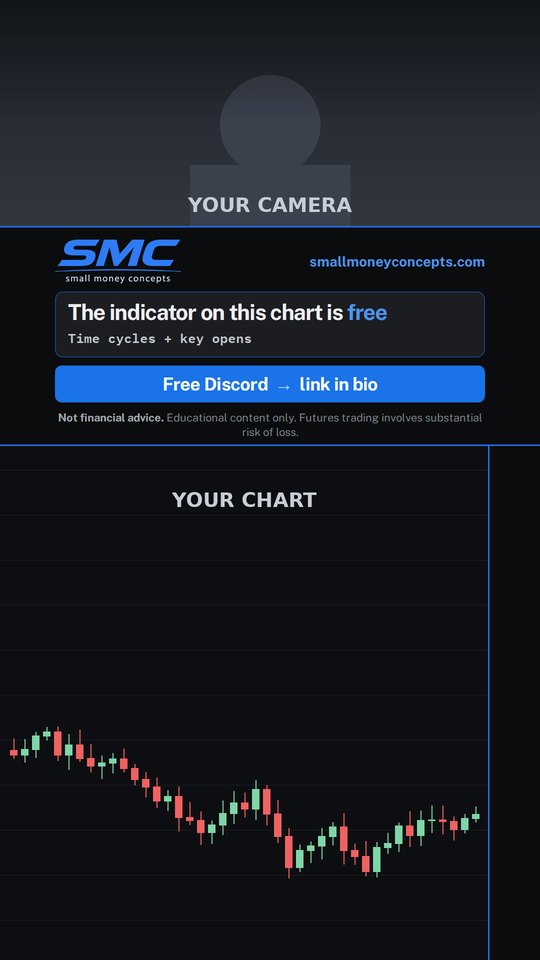
What it looks like: your face in the top area, the SMC band in the middle (logo, "the indicator on this chart is free", "Free Discord, link in bio"), and your TradingView chart filling the bottom.
Everyone uses the same overlay. It's tall (1080 × 1920), the same shape as a phone screen, and built so TikTok's buttons and comments don't cover anything important.
C:\SMC TikTok Live Overlay Setup. That's where OBS looks for the pictures, so everything loads with no extra steps.The preview in the middle of OBS turns tall, like a phone. (This sets the size to 1080 × 1920 at 30 fps.)
C:\SMC TikTok Live Overlay Setup. Click Search Directory…, pick the SMC folder, then Apply.You should now see the SMC band and logo in the preview. The Sources box (bottom of OBS) lists: SMC Logo, SMC Overlay, Webcam, Chart (TradingView).
Keep your face in the middle. The far left and right edges get cut off on some phones, and the very top sits under TikTok's name badge.
Grey boxes or a Missing Files window: OBS can't find the SMC pictures. Click Search Directory…, pick the SMC TikTok Live Overlay Setup folder, Apply.
LIVE Studio shows black: close LIVE Studio, click Start Virtual Camera in OBS, then open LIVE Studio again.
OBS Virtual Camera isn't in the list: restart your computer, open OBS, Start Virtual Camera, then open LIVE Studio.
Chart is black in OBS: double-click the chart source and set Capture Method to Windows 10 (1903 and up).System Settings → Privacy & Security → Screen Recording → turn on OBS, then restart OBS.
Preview is wide, not tall: redo "Import the SMC profile". Or Settings → Video → set both resolutions to 1080x1920.
Still stuck? Open START HERE - Setup Guide inside the SMC folder, or post a screenshot in 💬│growth-chat.
Everything above done? DM me on Discord.
1. TikTok: https://www.tiktok.com/@yourname.smc
2. Instagram: https://www.instagram.com/yourname.smc
3. Whop: https://whop.com/@yournamesmc
4. Screenshot of my OBS stream picture (attached)
Real screenshots only. Need ideas? Check 📳│content and 📳│training in the Discord.
Everyone starts at 20%. Your rate goes up with how much you post, not how much you sell. I check at the end of each month and changes start on the 1st.
Where everyone starts. Setup done and your link in your bios.
Every week: 5 lives (every trading day), 5 posts (also on Reels), 2 Snapchat stories. A full month of it, then message me.
Commission is paid on what the customer actually pays, every month they stay. Rates can change with notice. This isn't a job offer or financial advice. Full rules: Terms of Service, section 14.